
You do not leave this URL to generate. Front is required. Back is optional. One success spends 30 credits. Single is $8.99. Party Pack is $21.99 for three clips. The pack stays on this browser for about 30 days. Failed jobs return credits. The export is about ten seconds, vertical 9:16, with audio in the file. The nine-second source and the seven-second compare cut are trend lengths, not the length of your file.
What this page generates
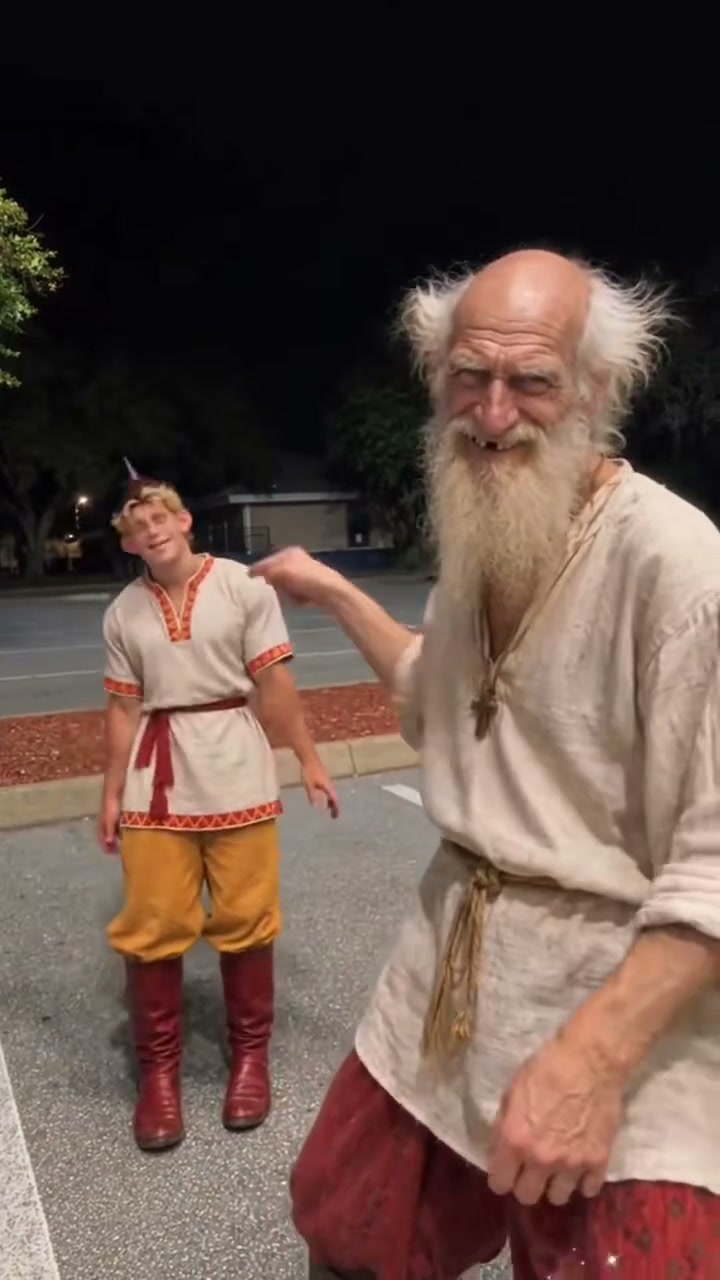
Hop Hop Hop AI Video Generator means the form above writes the job. Pick the Front face on the cast board and add a photo. Add Back only when a second person should replace the dancer who stands farther away. Then pay if this browser has no credits, and generate. The download is one MP4. It is not a project file and it is not four clips you have to stitch. The phone on the right of this page is the opening of the 30 October 2026 post by @hfki48573659, trimmed to the dance. The generate itself uses a different file as video 1: the 31 October 2026 post by @john_stockman, about nine seconds, two people in dark robes with green trim on a night road. Watch the studio phone if you want to see that motion reference before you pay. This page still runs the same form.
The cast dots sit on the robe-cut poster, not on the beige-costume phone. Front is the large face on the right, about half a second into that clip, when both noses are visible. Back is the smaller face on the left. Tap a dot, then pick a file. If you only watch the phone beside the form, you are watching @hfki48573659. That opening is a real second performance. The job still follows @john_stockman, because that nine-second file is video 1. Use the studio page when you want the phone and the motion reference to be the same clip.
The two roles
Front is the person who starts close to the camera, on the right in the opening of the robe cut. Front is the lead and is required. Lead is image 1. Back is the person who starts farther away, on the left in that opening. Back is optional. If you upload Back, that photo is image 2. If you leave Back empty, the farther dancer stays the person from video 1, including their face. Do not upload a photo of someone who did not agree to be in the clip. Pets are allowed as a face on the template body when the photo has no human face. A human headshot replaces the face only. A human full-body photo replaces face, body, and clothes for that role.
Front and Back are positions in the frame, not permanent names of the two people. By the middle of the robe cut they have traded who is close. The lead photo still belongs to the person who starts close, and the second photo belongs to the person who starts behind. If your two friends want the opposite assignment, swap the files before you upload. The board will not guess. A group selfie dropped on Front gives the model two faces in one crop, and the hop usually picks the wrong one. Crop to one person first.
What a headshot changes, and what a full-body photo changes
A headshot is a face-first photo: eyes, nose, and mouth readable, the body not the subject. For that photo the face comes from the image and the clothes, the body, the hop, the camera, and the night road come from video 1. A full-body photo shows the person from head toward the legs. For that photo the face, the hair, the body, and the clothes come from the image, and the dance timing, the swap, the arm reach, the crouch, and the camera still come from video 1. Mixing the two is normal. Front can be a headshot while Back is a full-body photo, or the other way around. The model is told not to keep a reference actor's face on a role that has an upload. If a face from the TikTok clip remains on a role you filled, regenerate with a sharper photo. Do not describe the robe as a film costume in your own extra tools.
The generate prompt does not name a wardrobe. Clothes follow video 1.
You can test the difference without a theory. Upload a passport-style Front photo and leave Back empty. The face should change and the dark robe should remain. Upload a full-length Front photo of someone in a jacket and jeans. The jacket should replace the robe on that role, and the hop should still be the night-road hop. If the jacket appears on Back as well, Back was not empty or the photo had two people. Fix the crop. Do not add a sentence about matching the reference clothes. That sentence pulls the robe back onto a full-body upload.
The four beats the motion reference uses
These are the beats in the @john_stockman cut, in order. At the open, both people stand on the road at night with hands out. The close person is large on the right. The other is smaller on the left. Next, the farther person hops and one knee comes up while the close person's hands drop lower. Then they swap. The person who was behind is now the large figure, smiling, with an arm raised across the frame, and the other person is at the left edge. At the end the close person reaches an open hand toward the camera and the farther person is in a crouch with a fist near the face. Your generate is asked to keep that order. It is about ten seconds, so it is not a frame-matched copy of the nine-second file. The 30 October opening has the same front-and-back idea in different clothes.
It is not a fifth beat, and it is not mixed into the middle of the robe dance.
A useful way to watch the nine-second file is to pause near half a second, near two and a half seconds, near five seconds, and near eight seconds. Those four pauses are the stills on the studio page. They are not a storyboard you have to hit in an editor. The model gets the whole muted video, not four frozen frames. If your result has the hands, the knee, the swap, and the crouch in that order, the beats landed. If it is only two people waving, the motion reference was not followed and a retry is the next step, not a new template.
Same as the trend, changed on purpose, not included
Same as the trend: a vertical night exterior, two roles, hops with the hands leaving the body, a knee lift, a change in who is close, an arm toward the lens, and a crouch. Changed on purpose: your faces or your full appearance, depending on the photo, and a file length of about ten seconds instead of the nine-second or seven-second source cuts. The audio in the download is the demo soundtrack muxed on our side, and you may swap it on TikTok. Not included: the screen recording that follows the dance in the longer 30 October file. We cut the compare clip at seven seconds so that phone UI is not part of the trend demo. Not included: a promise that the result will match a film, a house crest, or a named character. The 31 October caption contains the tags emo, halloween, and harrypotter. Those are the post's tags.
They are not our branding, and we are not affiliated with that film or its rights holders. Not included: a view count. We did not measure one.
Same, changed, and absent are the only honest comparison. We do not say the generate is identical, and we do not say it is unrelated. The night, the pair, and the hop order are the same idea. Your identity and the ten-second length are the deliberate changes. The phone-screen ending, the film tags, and any view count are absent. When a friend asks if this is the TikTok, the accurate answer is that the dance is the trend and the file is a new generate. The handles on the page are the sources you can open, not a signature inside your MP4.
The sound
TikTok's label on both source files is original audio, suara asli, by Venadeaakira. We repeat that label so the credit is accurate. We do not add a story about who wrote the hop. The generate request sends no audio URL. The provider returns a video, and the download route replaces the audio with the demo soundtrack taken from the motion-reference file. You hear that mix in the result player because the player uses the download route. If you want silence, or a different song you have rights to use, change the audio in the editor you already use. Do not ask a prompt box to reproduce a commercial recording. Our prompt does not name a song to copy.
Hear the difference before you post. The studio phone plays the @john_stockman file with its own soundtrack and with controls, so a browser can start audio after you press play. The generate request does not send that audio to the model. The file you download receives the demo soundtrack at the download step. If the result player is quiet, use the download control rather than the raw provider link. If you replace the track on TikTok, you are choosing a different sound on purpose. Neither path asks the model to imitate a named commercial song.
Price, credits, and the download
One successful generate costs 30 credits. Single is $8.99 and buys one clip. Party Pack is $21.99 and buys three clips. There is no subscription in this price. Credits stay on this browser for about 30 days from purchase. You pay before the job runs. If the provider job fails, the credits for that job are returned when a paid cookie is present. The file is an MP4, about ten seconds, 9:16, with audio. Resolution follows the product default, which is 720p when the demo tier is off. This page does not offer a separate length, a landscape frame, or a watermarked free render. The same 30 credits apply on every other TrendShot template. Buying a pack here does not lock you to Hop Hop Hop only.
Read the pack as clips, not as a subscription. $8.99 is one successful generate. $21.99 is three. A failed job puts the 30 credits back when the paid cookie is present, so a provider error is not a second purchase. A file that finishes and that you simply do not like is spent. There is no meter for extra seconds. You cannot buy a longer hop on this template. You also cannot spend fewer credits for a silent export. Every success on the shelf is the same 30 credits and the same with-audio shape.
When the face or the hop breaks
If Front still looks like the person in the robe clip, the photo was too soft, too small, or turned away. Use a sharper face, looking at the camera, and regenerate. If Back still shows the reference face, you either left Back empty, which is allowed and keeps video 1, or the Back photo was unclear. If the knee lift or the crouch disappears, stay on this template so video 1 remains the motion. Switching templates changes the dance. If the clothes are wrong for a full-body photo, confirm the photo actually shows the body. A tight headshot will keep the robe. If the frame is sideways, that is not this export. The output is vertical. If the job errors, do not buy a second pack first. Failed jobs return credits. Then try one new photo.
Work one problem at a time. First confirm the dot you tapped is the role that looks wrong. A good Back photo will not fix a bad Front face. Second, confirm the photo is a single adult, in focus, facing the camera. Third, regenerate once. If the second file has the same broken face, the crop is still the problem. If the second file has the right face and a missing crouch, stay on this template and try again rather than moving the photos to a different dance. A different template has a different video 1.
A manual route, then one tap here
A manual route looks like this. Save a reference you have rights to study. In an editor such as CapCut, cut the hop into the beats you want, about a second of hands-out, the knee lift, the swap, and the reach with the crouch. Generate or film each beat with your own photos. Drop the clips on a timeline. Add audio in the editor. Export 9:16. That path is real, and it is slower, and the lengths will not match our file. CapCut's prices and templates are CapCut's, not ours. We are not CapCut. The one-tap path is the form on this page. Cast Front, cast Back if you want, pay 30 credits if needed, generate, and download one with-audio file. You do not type the prompt. The prompt is locked to this template so the roles stay numbered correctly.
People who already edit can ignore the form. Build the four beats, add audio, and export. People who do not want a timeline should ignore the beat timings in the prompt guide. Those timings are a manual plan. They are not knobs on this page. There is no field for nine seconds versus ten, and no field for a custom caption. The button runs the locked job. If a dedicated hop app asks for a script, that app is not this form. We do not review those apps and we do not copy their prices.
Photos that work on the cast board
Front needs one face, large enough to see both eyes. Daylight or a lamp is enough. A plain background helps the face, not the dance. Back can be a different person. If you only have one photo, generate with Front alone. The empty Back role keeps the reference dancer. Avoid sunglasses, a hand over the mouth, a group crop where two faces compete, and a tiny face in a wide landscape shot. A pet photo can map as a face on the human body of that role. A full-length mirror photo maps as a full appearance replace. Do not upload a photo of a minor. The product is for adults.
The board is a poster with two targets. You do not drag a face onto the video. You tap Front or Back, and the file picker opens. After a photo is in, a small preview replaces the empty state for that dot. Clear it if you chose the wrong file. The preview is not the generate. It only shows what you are about to send. A dark photo of a bright face can still work. A bright photo where the face is twenty pixels wide usually does not. Move closer and shoot again.
Which version was biggest?
We cannot say. Between the two posts we downloaded, the 30 October upload is earlier and its caption uses the word viral. The 31 October upload is the one we use as the motion reference because it is a clean nine-second dance without a phone-screen ending. Earlier is not the same as bigger. Viral in a caption is not a measurement we took. We did not read a public view counter into this article. If you need a ranking, you will need counts we do not have. Until then both versions are credited and neither is called the winner.
Keep the two dates in order and stop. 30 October 2026 is @hfki48573659. 31 October 2026 is @john_stockman. The first of those files is longer and contains a screen recording after the dance. The second is the one we trust as video 1 because the dance runs to the end of the file. None of that is a popularity chart. If a later post from either account gathers a public count, this paragraph still will not invent today's number. Come back to the posts themselves if you need a live count.
How close the result gets
Expect the hop order, the night road, and two bodies in the frame. Expect your Front face, or your full look if the photo is full-body. Expect Back to match the second photo only when you uploaded one. Expect about ten seconds with audio, not a shot-for-shot duplicate of either TikTok. Hands and hops are the parts that usually survive. Fine costume crests and small accessories are the parts that slip. A quilted bag strap is visible on the close person in the robe cut. It may or may not survive. Treat that as detail, not as a checklist item you can demand. If the result is unusable, a failed provider job returns credits. A finished file you simply dislike is a spent generate.
Judge a finished clip in three looks. At the start, is there a close person and a farther person. In the middle, did someone change who is close. At the end, is there a reach and a crouch. Faces are the fourth look, and they matter more than the crest on the robe. A soft crest with the right face is a usable hop. A sharp crest with the reference actor's face is not, if you uploaded a replacement for that role. The empty frame on the studio compare stays empty until you put your own file there. We do not ship a fake after as if it were yours.
Posting the clip
Download the MP4 and post it as a vertical video. Keep the platform's AI label on if the app asks. Credit is already on our page for the references. You do not have to pretend the dance was filmed in one take on your street. If you want the sound that TikTok has attached to other hop posts, add that sound in TikTok after upload. Our file already has audio, so you may be replacing a track rather than filling silence. Do not claim the clip is an official video from @john_stockman, @hfki48573659, or a film studio. Say it is your generate. The studio page, the how-to, the what-is page, this generator, the meme note, and the prompt guide are separate URLs so each one can rank for its own question.
Write a caption that matches what you did. You generated a hop from photos. You did not film the credited accounts, and you did not join their post. Tagging the trend words is your choice. Tagging the film hashtag from the 31 October caption is also your choice, and it does not make the clip official. If the app asks whether the video is AI-made, answer yes. The download is already vertical, so you should not crop it wider for a feed that wants 9:16. If a sound you add on TikTok is shorter than the file, let the app trim. Do not re-time the dance inside another generator.
Step-by-step for this trend: how to make the Hop Hop Hop AI video.
Prompt and pipeline: Hop Hop Hop AI prompt. Generate: Hop Hop Hop AI video.
FAQ
Does Hop Hop Hop AI Video Generator work on this URL?
Yes. The form on this page submits the generate. You do not have to open the studio first, though the studio shows the motion reference.
Which video does the job follow?
The @john_stockman cut from 31 October 2026. The phone on this generator page is @hfki48573659, a different performance of the same hop.
Do I need two photos?
No. Front is required. Back is optional. An empty Back keeps the farther dancer from the reference.
What is image 2?
Back, if you upload it. Lead is image 1. The next uploaded photo is image 2.
How long is the file?
About ten seconds. The source cuts are about nine seconds and about seven seconds. Those are trend lengths.
What does it cost?
30 credits. Single is $8.99 for one clip. Party Pack is $21.99 for three. Failed jobs return credits.
Is the audio included?
Yes. The download is with-audio 9:16. You may replace the track on TikTok.
Can I use a pet?
Yes, as a face on that role's body, when the photo has no human face.
Are you affiliated with the TikTok posters?
No. We credit @john_stockman and @hfki48573659 and link the posts. Rights stay with the owners.
What if the face is wrong?
Use a sharper Front photo and generate again. A failed job returns credits. A completed clip spends the 30 credits.
Can I get a horizontal video?
No. This template exports 9:16 only.
Do I write a prompt?
No. The prompt is locked. The prompts-included guide shows the manual version if you want to build the hop in an editor yourself.