
What you are making
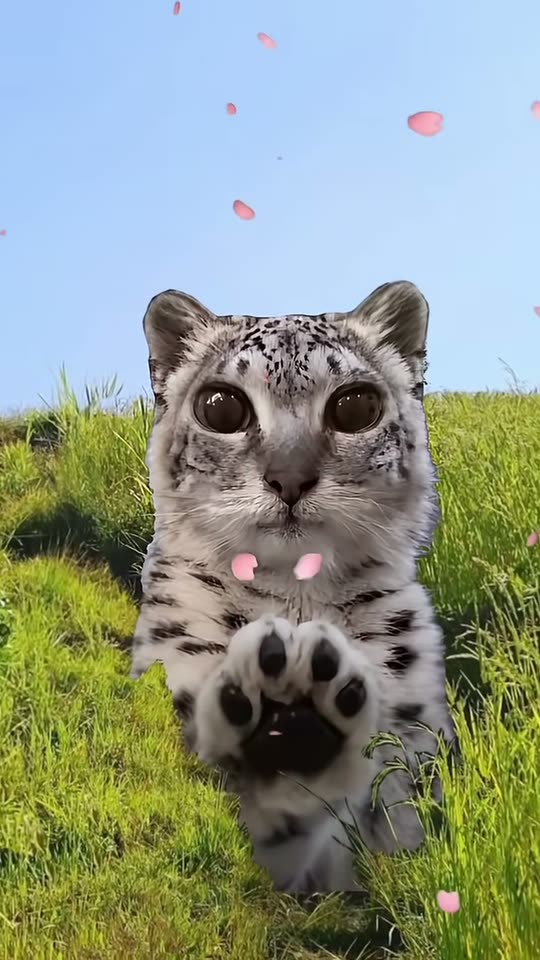
The clip is the October 2026 meadow hop: a spotted cat with huge round eyes moves through green grass, pink petals in a blue sky, both front paws held toward the camera. People caption it paws at you and add a punchline.
The phone on this page is credited to @noperscan. We measured that file at 16.7 seconds. The file you download after a successful generate is about ten seconds. The longer cut is the trend clip, not the export.
The photo that keeps the face
Use one pet or one person. The face should be large, both eyes open, in daylight. A pet photo or a headshot replaces the face and leaves the spotted body, the hop, and the paws on the reference clip.
A full-body photo of a person replaces the whole look, including clothes. This page will not add a snow-leopard onesie, a zoo window, or a second animal at your shoulder. Those are other posts in the wider meme.
Credits before you generate
One successful generate costs 30 credits. Single is $8.99 for 30 credits, one clip. Party Pack is $21.99 for 90 credits, three clips. Pay before Generate unlocks. The pack stays on this browser for about 30 days. There is no account.
If the job fails, the credits for that job come back. You can retry with another photo while the pack is still on this browser.
Six steps
- Choose one photo: your pet or you, face large, eyes open, alone in the frame, in even light.
- Upload it on this page. The page is locked to this template.
- If this browser has no credits, buy Single ($8.99, one clip) or Party Pack ($21.99, three clips). The pack stays about 30 days. There is no account.
- Generate. The face comes from your photo. The meadow, the hop, and the paws come from the reference clip. You do not type a prompt.
- Download the with-audio 9:16 MP4. If the job fails, credits for that job are returned.
- Post on TikTok, Reels, or Shorts. Add a paws-at-you caption if you want the joke. You may replace the track in the app.
Why the face or the paws go wrong
| What you see | Likely cause | Fix |
|---|---|---|
| The clip's face is still there | The upload is soft, dark, or side-on | A sharp front-facing photo, then retry |
| Extra toes or a blurred paw | Fast motion in the hop | Retry. The paws are supposed to stay the two from the clip |
| A second animal appears | Two subjects in the photo | One pet or one person only |
| Your street clothes replace the coat | A full-body human photo | Use a headshot or a pet if you want the spotted body |
| You expected a zoo window | This page follows the meadow hop | The glass still is a different post. This maker follows the credited clip |
| The file has audio | Expected. The download includes the demo soundtrack | Replace the track on TikTok if you want another sound |
What changes and what stays
What changes: the face from your photo. What stays: the meadow, the petals, the hop, the raised paws, and the camera. A full-body human photo also changes clothes. The export is about ten seconds even though the credited clip is 16.7 seconds.
Posting the with-audio file
- Keep the file vertical for TikTok, Reels, and Shorts.
- The MP4 already has audio. Replace it in the app if you want a different track.
- The joke usually lives in the caption: paws at you, then a short punchline.
- Hashtags people use include the snow leopard Mei Mei tag. We did not recount that tag.
Ready to generate? Snow Leopard Paws at You AI video.
Related pages
- Snow Leopard Paws at You AI video
- What is the Snow Leopard Paws at You AI trend?
- AI Snow Leopard Paws at You Meme Explained
- Snow Leopard Paws at You AI Video Generator
- How to do the Snow Leopard Paws at You AI trend (prompts included)
On this page
How to make the Snow Leopard Paws at You AI video is the job of this page.
How to make the Snow Leopard Paws at You AI video starts from one photo.
How to make the Snow Leopard Paws at You AI video keeps the hop from the reference clip.
How to make the Snow Leopard Paws at You AI video costs 30 credits per successful generate.
How-to questions
How to make the Snow Leopard Paws at You AI video?
Upload one photo on this page, pay 30 credits if you need a pack, generate, and download a with-audio 9:16 file of about ten seconds.
Do I need CapCut?
No. Generate in the browser. CapCut is a separate editor. You do not type a prompt on this page.
Does the download include sound?
Yes. The file includes the demo soundtrack. You may replace the track on TikTok. The request does not ask the model to copy a commercial song.
Why does the face stay the leopard's?
The photo is too soft or the face is too small. Use a sharp front-facing crop and retry. A failed job returns its credits.
What does a failed try cost?
A successful generate costs 30 credits. Single is $8.99. Party Pack is $21.99. Failed jobs return the credits for that job.
How is this different from the prompts page?
This page is the tutorial: photo, steps, failures, and posting. The prompts page is the manual route plus the one-tap alternative.